
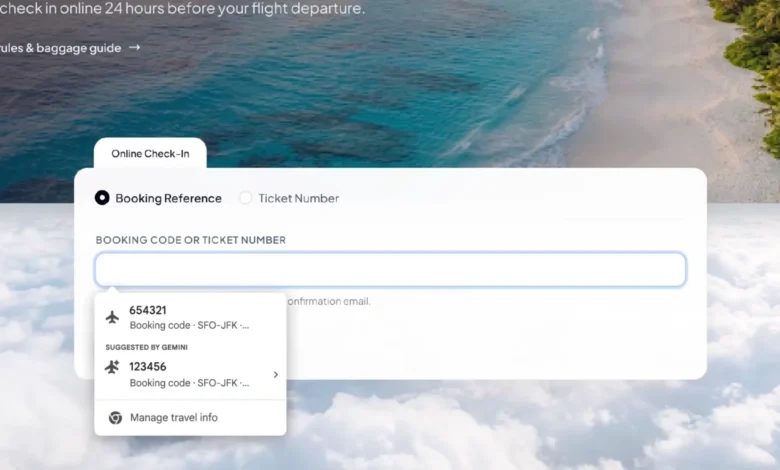
Google has introduced an upgraded autofill capability for the Chrome browser, integrating Gemini and Personal Intelligence to extract relevant data directly from user Gmail accounts. The new feature expands traditional browser autofill functions—which previously focused on standard entries like names, addresses, phone numbers, and credit card details—to locate and suggest order numbers, package tracking codes, and flight reservations based on the active web form.
The integration is designed to eliminate the need for users to manually search through emails and copy information into separate browser tabs. When Chrome detects that a webpage form requires specific information, such as a shipping tracking number or a flight booking reference, it generates suggestions derived from shipping notifications or airline confirmation messages found in Gmail.
Under the hood, the capability relies on Personal Intelligence, which allows authorized Google services to provide context-aware assistance for specific tasks. When suggestions appear in the Chrome autofill menu, users can review the proposed data and verify its source before choosing whether to apply it, ensuring they maintain control over the process rather than relying on fully automated entry.
Google stated that the rollout has begun for U.S. users on desktop versions of Chrome, as well as for mobile users leveraging Gemini within Chrome on iOS and Android platforms. To utilize the enhanced functionality, users must enable Personal Intelligence features and meet specific account qualifications, as the deployment follows a phased rollout schedule.
Privacy and data control mechanisms accompany the release. Google emphasizes that sensitive information involved in autofill operations undergoes encryption, and users retain the ability to disable the enhanced feature, restrict data access, or delete individual suggestions. Nevertheless, the integration of browser tasks with personal email records has prompted discussions regarding the scope of personal data usage. Because Gmail accounts contain diverse communication records, including purchase receipts, travel itineraries, and billing statements, users must navigate account settings to understand and manage how and when their information is accessed.
Looking ahead, Google has outlined plans to expand the scope of the enhanced autofill system in future phases, including safely extracting relevant information from Google Photos to assist with form completion. This builds upon recent architectural changes in Chrome, which saw the introduction of smarter form-comprehension tools for complex data like passport numbers, driver’s license details, and vehicle identification numbers throughout 2025, alongside mobile expansions and Wallet integrations in 2026.
The latest update shifts Chrome’s autofill utility from simply recalling previously saved static details to actively searching and interpreting context from connected cloud services. While the system aims to streamline workflows for frequent online shoppers and travelers, its long-term utility will depend on its ability to accurately match field requirements, avoid outdated or ambiguous confirmation details, and provide transparent data governance for users.