

Apple has rolled out a built-in feature designed to combat intrusive shake-to-ad practices, giving device users direct control over which applications can access their device’s motion sensors. The new setting addresses a widespread user complaint regarding mobile applications that abruptly redirect users to promotional content or payment portals following minor, often unintentional device movements.
The feature, identified within system settings as “Restrict Action Data,” can be accessed by navigating through privacy and security menus to motion and fitness controls. By selecting edit options, users can populate a restricted list of applications prohibited from accessing device motion data. Restricting an application prevents it from processing acceleration, attitude, rotation, and magnetic field information, thereby cutting off the technical pathway that allows software algorithms to register a shake and execute an immediate advertising redirect.
Software engineering insights highlight that these disruptive advertisement triggers rely on device accelerometers and gyroscopes. Applications frequently program sensor sensitivity near critical thresholds, meaning normal physical movements such as walking down the street or experiencing minor vehicle vibrations while commuting can easily register as an intentional user action. Consumer complaint platforms have cataloged thousands of grievances detailing accidental triggers, unwanted redirects to checkout pages, and difficulties bypassing persistent splash-screen advertisements.
Apple’s developer guidelines previously stipulated that motion and fitness application programming interfaces should be reserved strictly for health, exercise, and fitness services rather than monetization or advertising campaigns. The new software implementation reinforces these boundaries by routing raw sensor permissions directly through user-managed system controls rather than relying entirely on developer compliance.
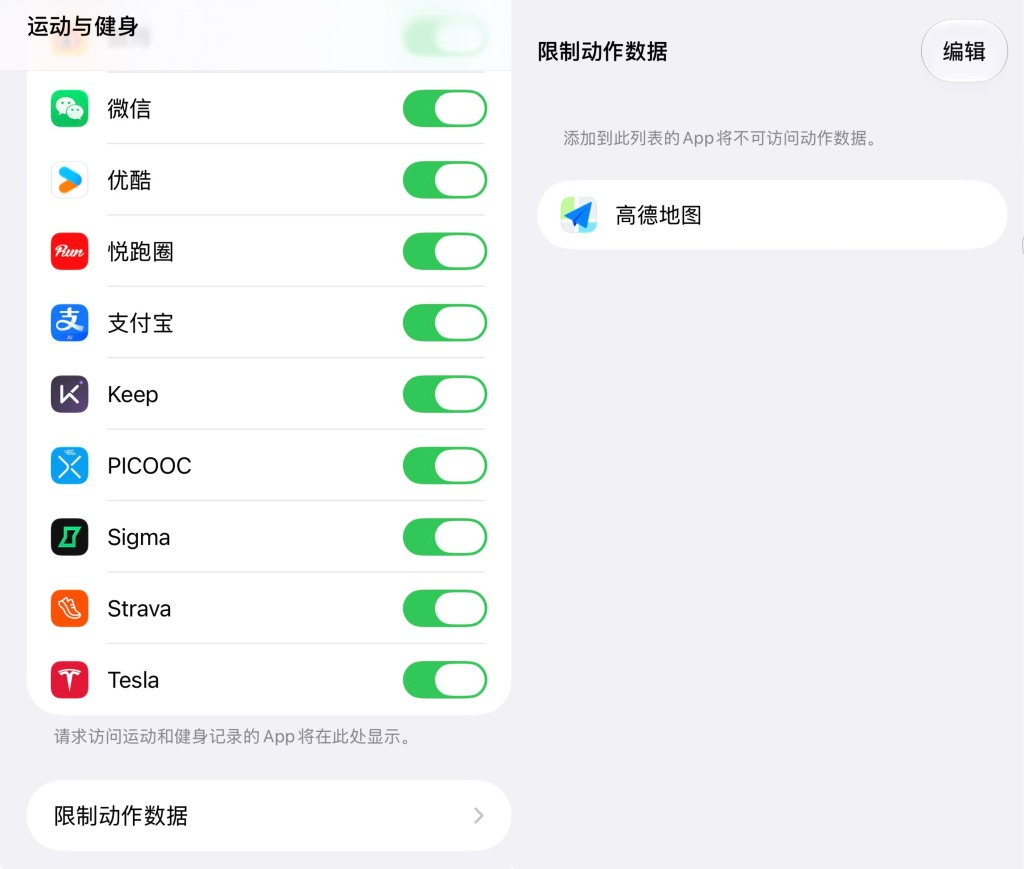
Industry testing demonstrates that enabling the restriction stops unwanted transitions while leaving the baseline visual advertisements intact. For example, applying the restriction to navigation software prevents a minor phone jolt from launching an external promotional landing page, even if the initial splash graphic continues to appear on screen. However, consumers must weigh potential utility losses, as restricting motion permissions can also impact legitimate navigation, fitness tracking, and specialized services that rely continuously on device sensor inputs.
The software package also introduces additional device enhancements alongside the privacy tool. Support for USB-C Apple Pencil accessories has been added for specific hardware models to assist with handwriting and document markup workflows, alongside an edge lighting feature that utilizes screen illumination to brighten a user’s face during video calls.